1· Deliver questions 2· Collect answers Done.
Students Get software + info Instructors Evaluate Use Exam2 Coupon Codes Get software
|
|||||||||||
|
Exam2 enables remote exams and assignments
Organized Timely Free
|

|
||||||||||
|
How Exam2 works
Instructors Students Instructors
|
|
||||||||||
|
How to evaluate Exam2
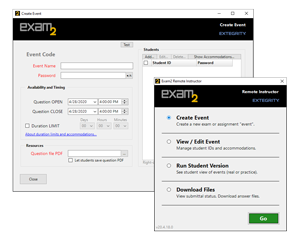
1· In Exam2 Instructor create an event. (You'll need a Coupon Code.) 2· Switch to Student Version, get the question, create an answer file, upload it. 3· Switch to Download Files, view what you submitted.
|
Get Exam2 Instructor Download for macOSDownload for Windows |
||||||||||
|
Coupon Codes
Exam2 uses Coupon Codes to manage access. ² Free for most institutions.
|
|||||||||||
|
How to use Exam2
Instructor Create an event · In Exam2 Instructor app, enter a name for the “event” (exam, task, etc.) Inform students of Event Code + student passwords
Students Download and install the Exam2 Student app Prepare answers · In Exam2 Student, enter Event Code + student password Upload answer files · In Exam2 Student, select answer file to upload
Instructor Download answer files · In Exam2 Instructor, enter the Event Code + event password
|
|
||||||||||
About Extegrity
With our flagship system—Exam4—Extegrity has more than two decades of tightly focused experience solving this exact task for US law schools and state bar examiners. We have delivered millions of the highest-stakes exams, both remotely and in proctored (invigilated; monitored) rooms on laptops secured by Exam4 software. Future upgrades for Exam2 will add tools to secure laptops for in-class exams, as Extegrity does now for law schools and state bar exams, plus other premium options.
|
 |
||||||||||
|
|||||||||||



 ©2020
©2020